Menus groups related options or actions to the user in a compact dropdown overlay, and can be triggered by various different buttons.
AnatomyPermalink to: Anatomy
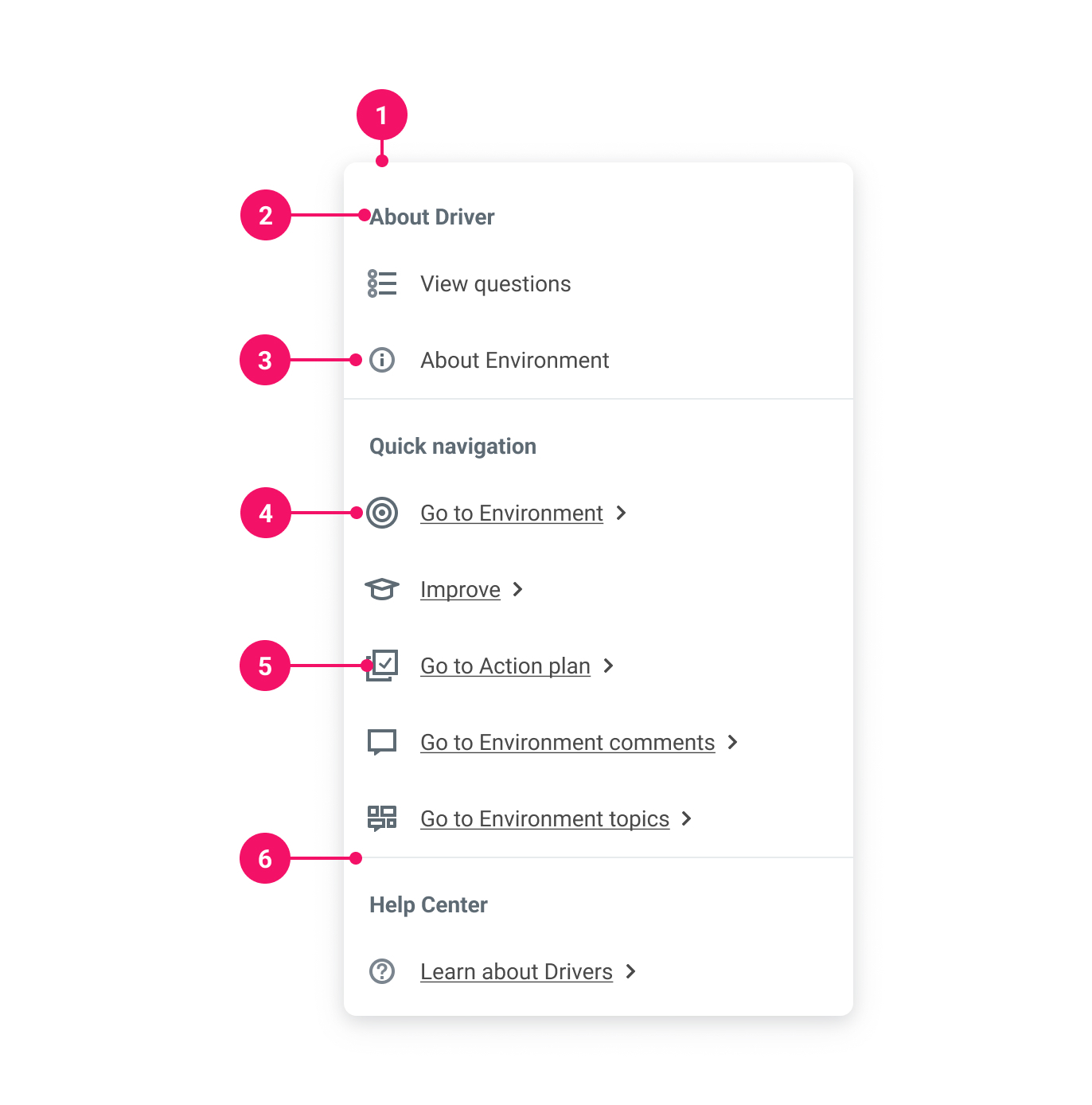
-
Container
-
Group label (optional)
-
Button Item: Used to trigger actions
-
Link Item: Used for navigation
-
Icon (optional)
-
Group divider
UsagePermalink to: Usage
When to usePermalink to: When to use
- Use a Menu to present a set of related actions when space is limited.
When not to usePermalink to: When not to use
- Do not use Menu as a top level application menu, see the Accessibility section for more information.
AccessibilityPermalink to: Accessibility
RolesPermalink to: Roles
The menu provides a list (role="list" and role="listitem") of buttons and/or links in a regular popover, and does not use any of the menu* aria roles, which means it cannot be used as eg. a top level application menu.
GroupsPermalink to: Groups
Menu.Group provides a semantic way of grouping items visually and for assistive technologies, and the label is a good way to add more context.
Trigger and Items ARIA attributesPermalink to: Trigger and Items ARIA attributes
Menu.*Trigger components and Menu.Items comes with a set of ARIA attributes that are automatically applied and connects them for assistive technologies via the aria-controls, aria-expanded and aria-haspopup attributes.
ExamplesPermalink to: Examples
ItemsPermalink to: Items
Button ItemsPermalink to: Button Items
Button Items are responsible for triggering actions, eg. "Edit", "Archive", "Delete", and should not be used for actions that are navigation related.
The selected prop can be used to indicate a selected state of the Button Item, eg. when used in a filter (See Value Button Trigger example).
Activating a Button Item will close the Menu as default, but can be prevented by using the preventClose prop.
Open
import { Menu } from "@peakon/bedrock/react/menu";
import { SystemIcon } from "@peakon/bedrock/react/assets/SystemIcon";

function Snippet() {
  return (
    <Menu>
      <Menu.IconButtonTrigger
        variant="tertiary"
        rounded
        accessibleName="Actions"
        icon={<SystemIcon name="navigation-basic-navigation-more-vertical" />}
      />
      <Menu.Items>
        <Menu.ButtonItem>Edit</Menu.ButtonItem>
        <Menu.ButtonItem>Archive</Menu.ButtonItem>
        <Menu.ButtonItem>Delete</Menu.ButtonItem>
      </Menu.Items>
    </Menu>
  );
}
Link ItemsPermalink to: Link Items
Link Items are responsible for navigation, and should be used for actions that changes the URL or URL parameters.
Activating a link will always close the Menu.
Open
import { Menu } from "@peakon/bedrock/react/menu";
import { SystemIcon } from "@peakon/bedrock/react/assets/SystemIcon";

function Snippet() {
  return (
    <Menu>
      <Menu.IconButtonTrigger
        variant="primary"
        rounded
        accessibleName="Profile"
        icon={<SystemIcon name="navigation-user-profile" />}
      />
      <Menu.Items>
        <Menu.LinkItem href="#">Settings</Menu.LinkItem>
        <Menu.LinkItem href="#">Log out</Menu.LinkItem>
      </Menu.Items>
    </Menu>
  );
}
Checkbox itemsPermalink to: Checkbox items
Checkbox items are used to toggle one or several states inside a Menu.
Even though they visually resemble a <input type="checkbox" />, they are not actual HTML Input Elements, but rather a HTML Button Element with role="switch" with a aria-checked attribute.
Because they are not actual form elements, they come as controlled only, ie. you need to handle the state for checked manually.
Open
import { useState } from "react";
import { Menu } from "@peakon/bedrock/react/menu";
import { SystemIcon } from "@peakon/bedrock/react/assets/SystemIcon";

function Snippet() {
  const [checkedSettings, setCheckedSettings] = useState({
    "setting-1": false,
    "setting-2": true,
    "setting-3": false,
  });

  function handleSettingToggle(option) {
    setCheckedSettings({
      ...checkedSettings,
      [option]: !checkedSettings[option],
    });
  }

  return (
    <Menu>
      <Menu.IconButtonTrigger
        variant="secondary"
        rounded
        accessibleName="Settings"
        icon={<SystemIcon name="navigation-navigation-level-1-settings" />}
      />
      <Menu.Items>
        <Menu.CheckboxItem
          checked={checkedSettings["setting-1"]}
          onClick={() => handleSettingToggle("setting-1")}
        >
          Setting 1
        </Menu.CheckboxItem>
        <Menu.CheckboxItem
          checked={checkedSettings["setting-2"]}
          onClick={() => handleSettingToggle("setting-2")}
        >
          Setting 2
        </Menu.CheckboxItem>
        <Menu.CheckboxItem
          checked={checkedSettings["setting-3"]}
          onClick={() => handleSettingToggle("setting-3")}
        >
          Setting 3
        </Menu.CheckboxItem>
      </Menu.Items>
    </Menu>
  );
}
Items with iconsPermalink to: Items with icons
Icons can be used on items to make the actions more recognizable to the user.
Open
import { Menu } from "@peakon/bedrock/react/menu";
import { SystemIcon } from "@peakon/bedrock/react/assets/SystemIcon";


function Snippet() {
  return (
    <Menu>
      <Menu.IconButtonTrigger
        variant="tertiary"
        rounded
        accessibleName="Actions"
        icon={<SystemIcon name="navigation-basic-navigation-more-vertical" />>}
      />
      <Menu.Items>
        <Menu.ButtonItem icon={<SystemIcon name="edit-write" />}>Edit</Menu.ButtonItem>
        <Menu.ButtonItem icon={<SystemIcon name="actions-archive-icon" />}>Archive</Menu.ButtonItem>
        <Menu.ButtonItem icon={<SystemIcon name="edit-delete" />}>Delete</Menu.ButtonItem>
      </Menu.Items>
    </Menu>
  );
}GroupsPermalink to: Groups
Groups can come with and without a label. Remember to also wrap your "lonely" items in a group, to make sure the appropriate dividers are rendered between the groups (see example).
If you mix Button Items and Link Items inside the same Menu, it's recommended to keep them separated in their own groups to guide the user.
See the Accessibility section for more information.
Open
import { Menu } from "@peakon/bedrock/react/menu";
import { SystemIcon } from "@peakon/bedrock/react/assets/SystemIcon";

function Snippet() {
  return (
    <Menu>
      <Menu.IconButtonTrigger
        variant="tertiary"
        rounded
        accessibleName="Actions and links"
        icon={<SystemIcon name="navigation-basic-navigation-more-vertical" />}
      />
      <Menu.Items>
        <Menu.Group>
          <Menu.ButtonItem>Lonely action</Menu.ButtonItem>
        </Menu.Group>
        <Menu.Group label="Actions">
          <Menu.ButtonItem>Edit</Menu.ButtonItem>
          <Menu.ButtonItem>Archive</Menu.ButtonItem>
          <Menu.ButtonItem>Delete</Menu.ButtonItem>
        </Menu.Group>
        <Menu.Group label="Links">
          <Menu.LinkItem href="#">Your profile</Menu.LinkItem>
          <Menu.LinkItem href="#">Help centre article</Menu.LinkItem>
        </Menu.Group>
      </Menu.Items>
    </Menu>
  );
}TriggersPermalink to: Triggers
Triggers are used to control the open state of the Menu. There are three different types of triggers:
Icon Button TriggerPermalink to: Icon Button Trigger
This trigger is the most common one, and is used places where you need to group a set of actions, without taking up a lot of space.
Open
import { Menu } from "@peakon/bedrock/react/menu";
import { SystemIcon } from "@peakon/bedrock/react/assets/SystemIcon";

function Snippet() {
  return (
    <Menu>
      <Menu.IconButtonTrigger
        variant="tertiary"
        rounded
        accessibleName="Actions"
        icon={<SystemIcon name="navigation-basic-navigation-more-vertical" />}
      />
      <Menu.Items>
        <Menu.ButtonItem>Edit</Menu.ButtonItem>
        <Menu.ButtonItem>Archive</Menu.ButtonItem>
        <Menu.ButtonItem>Delete</Menu.ButtonItem>
      </Menu.Items>
    </Menu>
  );
}
Value Button TriggerPermalink to: Value Button Trigger
This triggers works well with the selected prop for the Menu.ButtonItem as the Value Button can hold both a label and a value, making it ideal for eg. filters.
Open
import { useState } from "react";
import { Menu } from "@peakon/bedrock/react/menu";

function Snippet() {
  const [value, setValue] = useState("Name");

  return (
    <Menu>
      <Menu.ValueButtonTrigger variant="primary" label="Sort by">
        {value}
      </Menu.ValueButtonTrigger>
      <Menu.Items>
        <Menu.ButtonItem
          onClick={() => setValue("Name")}
          selected={value === "Name"}
        >
          Name
        </Menu.ButtonItem>
        <Menu.ButtonItem
          onClick={() => setValue("Date of birth")}
          selected={value === "Date of birth"}
        >
          Date of birth
        </Menu.ButtonItem>
        <Menu.ButtonItem
          onClick={() => setValue("Start date")}
          selected={value === "Start date"}
        >
          Start date
        </Menu.ButtonItem>
      </Menu.Items>
    </Menu>
  );
}
Unstyled Button TriggerPermalink to: Unstyled Button Trigger
Please read the Unstyled Button usage guidelines before using this.
TL;DR: Use this component very, very sparingly.
Open
import { Menu } from "@peakon/bedrock/react/menu";
import {
  NavigationNavigationLevel1SettingsIcon as SettingsIcon,
  NavigationNavigationLevel1LogOutIcon as LogoutIcon,
} from "@peakon/bedrock/icons/system/react";
import { SystemIcon } from "@peakon/bedrock/react/assets/SystemIcon";

function Snippet() {
  return (
    <Menu>
      <Menu.UnstyledButtonTrigger
        accessibleName="Profile"
        style={{
          verticalAlign: "middle",
          width: "var(--spacing-48)",
          height: "var(--spacing-48)",
          borderRadius: "50%",
          cursor: "pointer",
        }}
      >
        <span
          style={{
            display: "flex",
            width: "100%",
            height: "100%",
            backgroundColor: "var(--color-placeholder-bg-5)",
            color: "var(--color-placeholder-text-5)",
            borderRadius: "50%",
            fontSize: "var(--font-size-lg)",
            fontWeight: "var(--font-weight-bold)",
            alignItems: "center",
            justifyContent: "center",
          }}
        >
          HB
        </span>
      </Menu.UnstyledButtonTrigger>
      <Menu.Items>
        <Menu.LinkItem
          icon={<SystemIcon name="navigation-navigation-level-1-settings" />}
          href="#"
        >
          Settings
        </Menu.LinkItem>
        <Menu.LinkItem
          icon={<SystemIcon name="navigation-navigation-level-1-log-out" />}
          href="#"
        >
          Log out
        </Menu.LinkItem>
      </Menu.Items>
    </Menu>
  );
}
Props TablesPermalink to: Props Tables
MenuPermalink to: Menu
| Name | Type | Description | Default | Required |
|---|---|---|---|---|
children | React.ReactNode |
| — | Yes |
inlinePlacement | start | end | The placement of the menu relative to the trigger. | start | No |
menuId | string | The id for the menu, autogenerated if left blank. | — | No |
ItemsPermalink to: Items
Menu.ItemsPermalink to: Menu.Items
| Name | Type | Description | Default | Required |
|---|---|---|---|---|
children | React.ReactNode |
| — | Yes |
Menu.GroupPermalink to: Menu.Group
| Name | Type | Description | Default | Required |
|---|---|---|---|---|
children | React.ReactNode |
| — | Yes |
label | string | A visible label for the group | — | No |
id | string | The id for the group, autogenerated if left blank. | — | No |
Menu.ButtonItemPermalink to: Menu.ButtonItem
Props extend from HTMLButtonElement(external link)
| Name | Type | Description | Default | Required |
|---|---|---|---|---|
children | React.ReactNode | Content of the button. | — | Yes |
icon | React.ReactNode | Optional icon. | — | No |
selected | boolean | Whether the item is in a selected state. | — | No |
preventClose | boolean | Whether the menu should stay open after the item has been clicked. | false | No |
Menu.LinkItemPermalink to: Menu.LinkItem
Props extend from HTMLAnchorElement(external link)
| Name | Type | Description | Default | Required |
|---|---|---|---|---|
as | ElementType | React.ComponentType | The component to render the link as. | a | No |
icon | React.ReactNode | Optional icon. | — | No |
TriggersPermalink to: Triggers
Menu.IconButtonTriggerPermalink to: Menu.IconButtonTrigger
Props extend from IconButton(external link), with the omission of aria-controls, aria-expanded, aria-haspopup and onClick
Menu.ValueButtonTriggerPermalink to: Menu.ValueButtonTrigger
Props extend from ValueButton(external link), with the omission of aria-controls, aria-expanded, aria-haspopup and onClick
Menu.UnstyledButtonTriggerPermalink to: Menu.UnstyledButtonTrigger
Props extend from UnstyledButton(external link), with the omission of aria-controls, aria-expanded, aria-haspopup and onClick